Sony Camcorder Englishification
Table of contents:
Intro
My new hobby
So a little more than a year ago I got into the 2000s camcorder game, and started collecting various models that are interesting to me. Unfortunately in last 4 or so years due to an explosion of popularity of them due to various social media influencers, prices for them in Europe and other similar regions have exploded, so my best bet is importing from Japan. Many devices from there (not just cameras!) are usually in good condition, usually work fine and almost always cost a fraction of what they would where I live. Another bonus is that I like to fix things, so I instead get broken devices (to an extent, for example display ribbon cable replacement is an easy task for me, but board level issues I don’t have skills to fix yet) to fix them, learn about their workings, and then use.
But importing from Japan comes with a huge problem - pretty much all (at least Sony) cameras from there are stuck in Japanese language, with no way of switching to a different one (menu option is straight up missing), so you have to deal with it. But I am not one of those people who want to deal with it, and I always want to dissect a device for possible solutions.
So here comes my one of most advanced cameras that I’ve bought - a Sony HDR-SR12 - Full HD camcorder with a 120GB hard drive from 2008 which can still record really good quality videos. It initially had problems with it’s display, which I fixed quite easily (I actually made a video about this! You can see it here). As it is still a decent camcorder for today’s standards, I actually wanted to make it display everything in English for everyday use, so I started looking up for solutions.
Initial research
After searching for a general term “Sony Japanese camera language unlock” you are met with one (and only) result of a tool called “Sony-PMCA-RE”, which sadly seems to work only on more modern Sony devices (2010ish and onwards), so I kept looking for alternatives.
I found a level 3 service manual for this camera, skipped through it, and one thing stood out: 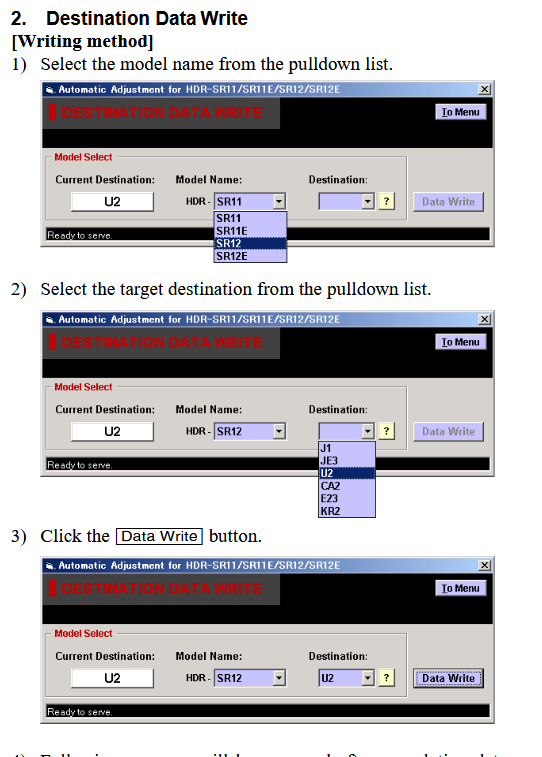
See how it shows a way of setting a region in “Destination” field? This is where I thought I could actually make this camera switch regions. However my excitement was shortlived - this tool is not leaked yet, and even if it was, apparently you need a “virgin” board to set things like this. If you do the same modification on an already used board, camera will no longer boot (this is also confirmed by the service manual, and I overlooked this warning): 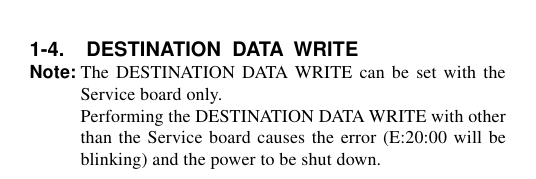
Sooooo yeah, this, what seemed to me at that time, the only option was a complete dead end, so I decided to just deal with it and keep using this camcorder with Japanese text. Surprisingly it is quite usable because menus have icons so you more or less can understand where is what. But I still couldnt live with the idea that I can’t understand what’s written everywhere.
Revisiting the idea
Remember how I mentioned a tool called “Sony-PMCA-RE”? Well, a few weeks ago I decided to read it’s documentation for a little bit, and noticed one small detail:  Wait a minute, an even older HDD camcorder is in the supported devices list?
Yeah, that’s exactly it! - Apparently those old camcorders, which use a “modern” UI (which I honestly don’t like at all - DV/HDV/early DVD and HDD camcorder UI is much better in my opinion) are supported, although partially - you can only get shell access. While my camcorder (SR12) wasn’t on the list, I was guaranteed that it would work. Sure enough, it did.
So now what?
Well, I did what I always do - try to snoop around the internal filesystem of a device I breached into. I thought I should be able to find some sort of program which is responsible for UI, and find the executable, a config file, or something else to edit and perhaps swap the language file or enable language selection menu. But my initial findings were fruitless, and pretty much everything what I tried to copy out seemed to be corrupted, or would copy out partially. So then I turned into my friend jason098 to ask for assistance and possible ideas.
First I tried to dump the whole thing, to have a backup, but it failed. Jason suggested me to run a few commands to figure out what is mounted on what, to possibly look for a few strings which are printed out in debug logs (the way how this camera UI works is extremely interesting, and it deservers a separate post, but I will probably not do that), and then to print a filelist of everything. This is where we hit a jackpot: 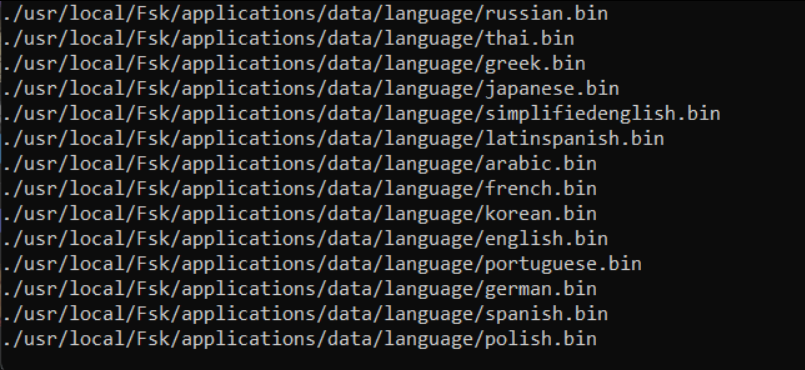 Language files!!!!
Yup, language files. I copied some of them out, and then did the easiest trick in the book - overwrote Japanese language file with English one.
Jason asked me if I could dump some of Fsk executable files (Fsk is probably the internal name of camera UI?) for RE to possibly enable language selector, and while I could dump smaller ones just fine, bigger than 1009kb files would not. With his help I had to split some files into multiple parts to successfuly copy them, and this was weird, probably a poor implementation of service shell access, but I paid no mind to it. Anyhow RE attempt was unsuccessful, so I decided to stick with fileswap method.
Success..?
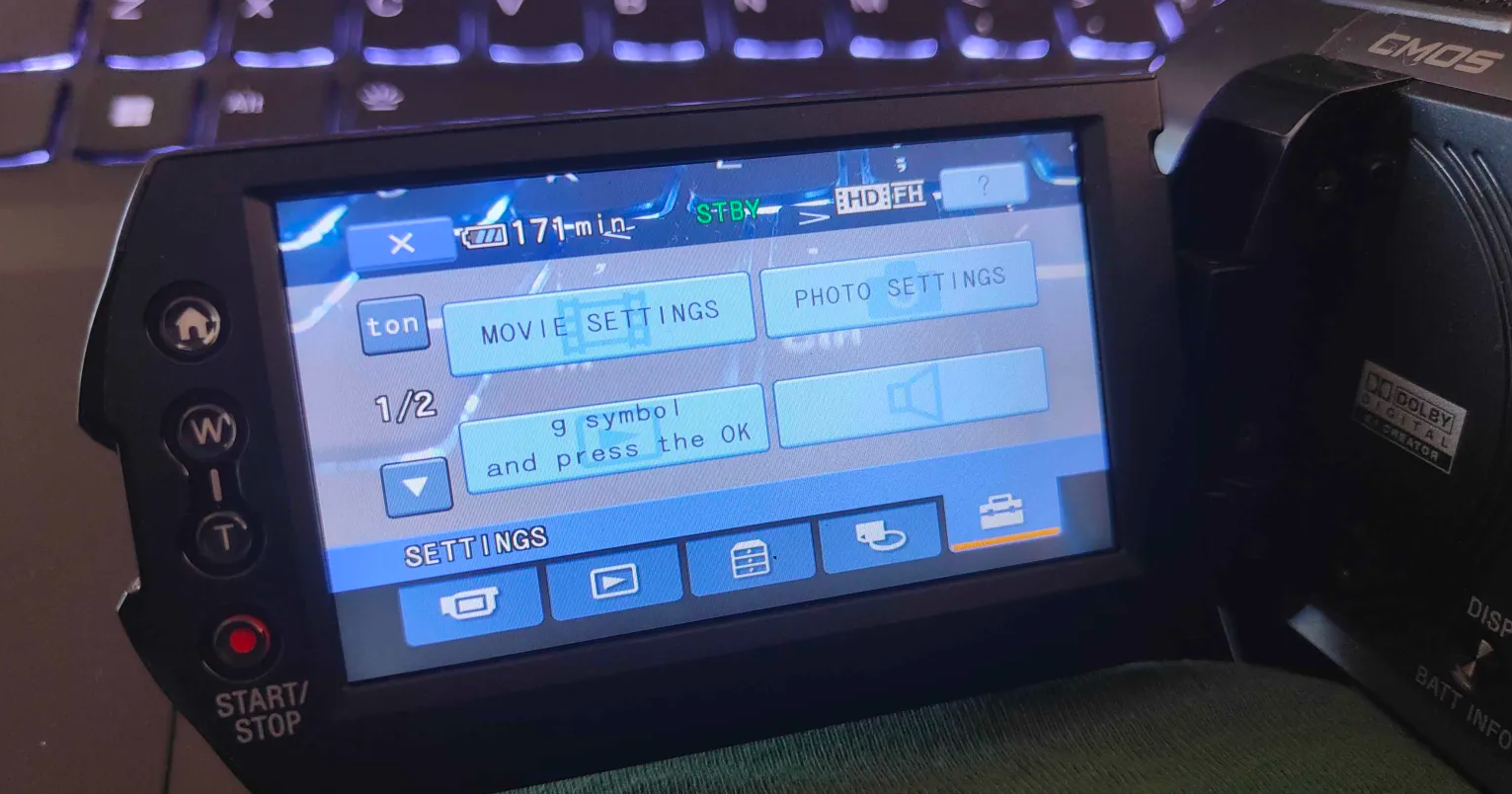 g symbol and press the OK
Well, it worked??? Some entries seem to be broken, but proof of concept works?
Well, motivation because I achieved something I thought to be impossible shot itself through the roof. With help from another friend Edness I reverse engineered how those language files are structured, vibe-coded decoding and encoding scripts, and went to work - I wanted to fix up the rest of the language file so that it displays everything properly.
On this I worked for a few days straight - but I couldnt get the pattern on how those broken strings work - it was really weird. So my motivation slowly burned out.
Actual success
Yesterday I decided to pick this up again, made my own localization language file to figure out some missing string locations, and went to work. But then I made a weird discovery - after resetting Japanese language file to original one I dumped, it also displayed everything wrong????? What the hell happened?
I asked for Edness’s help on figuring out what the hell happened, and he immediately pointed out his initial confusion from 2 weeks ago as to why language files have a few pointers to adresses which are outside of the file (we (mostly I) thought that this is a leftover from prototype stages, or something else), so I went to check, if file sizes were different of my dumped, and onboard file. Sure enough, they were.
Remember how I mentioned large files cutting off at 1009kb? Yeah, similar thing happened with language files, even though they were smaller - first 32kb copy just fine, then 512b just disappear, and then you get the rest of the file. So unfortunately, I lost the original Japanese language file, but English one was still untouched. With a couple of commands I split it, copied out, and sure enough, now it decoded properly and there were no corrupted strings.
The final stretch
This time I did something different - directly overwrote Japanese file with English one, and, after so much headache, I finally reached the goal I set myself almost 6 months ago: 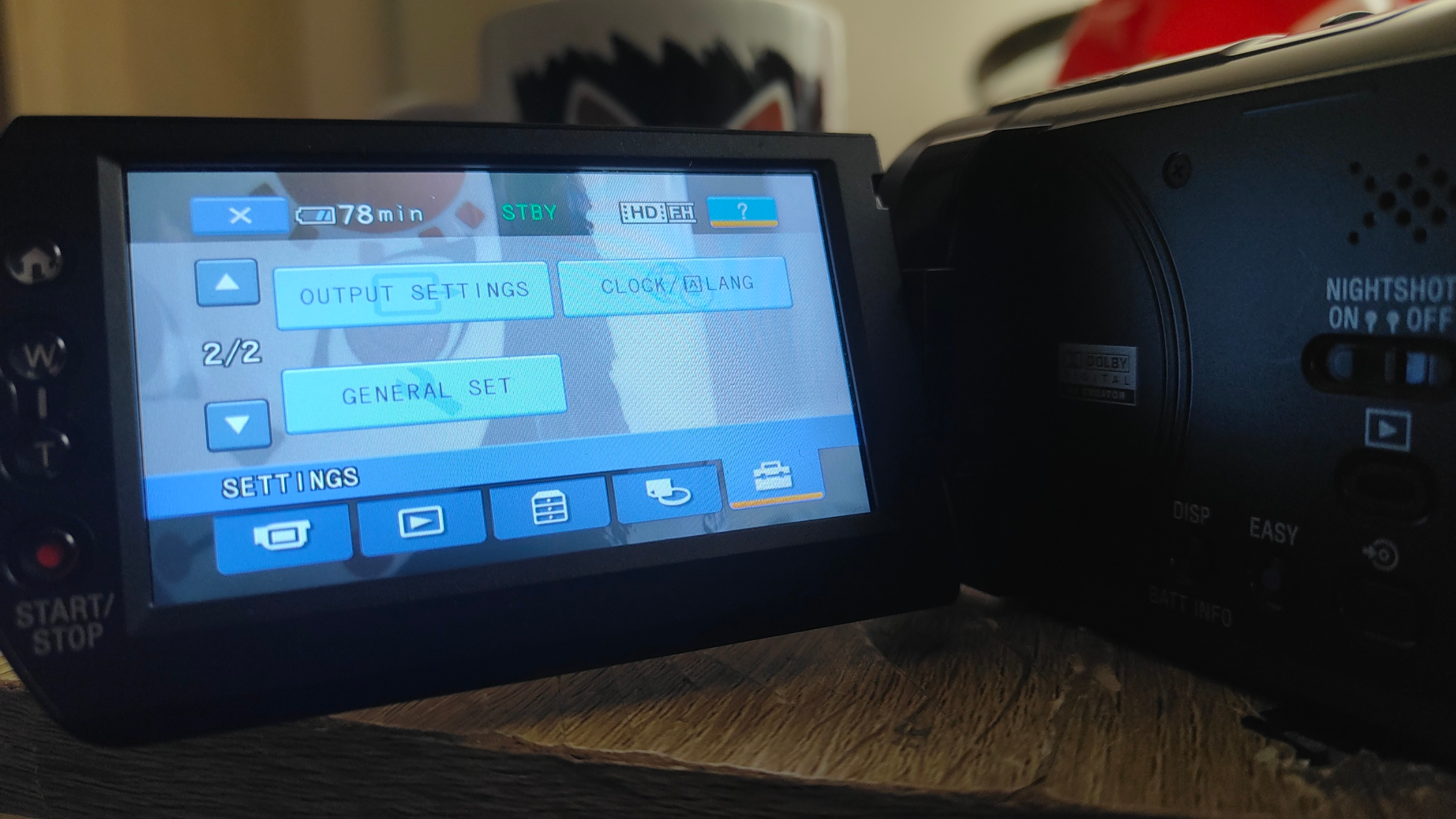 I present you the (probably) world’s first English-ified JDM Sony camera
At long last! I finally did something that was thought to be impossible. But now what?
Well, now that there is a proper base for the language file, I will eventually make a Lithuanian translation for this camera. But what does this mean for others?
A few things I could think of are:
- You can finally switch languages in JDM cameras (not only English! There’s many more language files in there).
- You can make your own language file by using my scripts.
- This method is most likely applicable for many more cameras which use the same UI.
Conclusion
What can I say - don’t fear to experiment with things you are genuinely interested in, who knows what you might achieve. I for one am extremely happy that I managed to do something that others told me is not possible.
Feel free to visit this repo for instructions how to do this yourself.
Huge thanks to Jason and Edness - without your ideas I would’ve probably been stuck at trying to fix that broken language file, if I’d even reached that part.